-
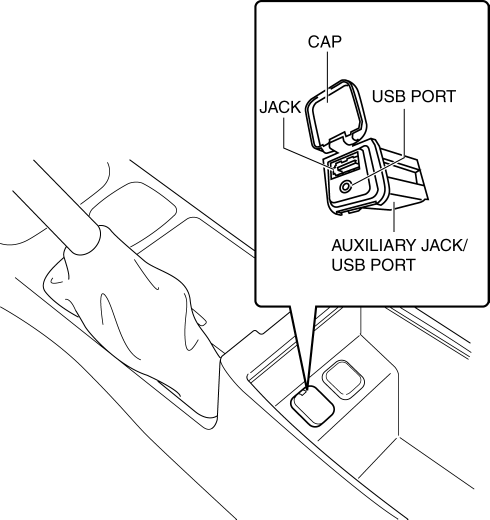
Auxiliary jack/USB port is installed inside the rear console.
-
An auxiliary jack and USB port are equipped.
The auxiliary jack/USB port outputs the audio signals of commercially-available portable audio, a USB device, or an iPod connected to the auxiliary jack/USB port to the audio unit.
Auxiliary jack/USB port is installed inside the rear console.
An auxiliary jack and USB port are equipped.
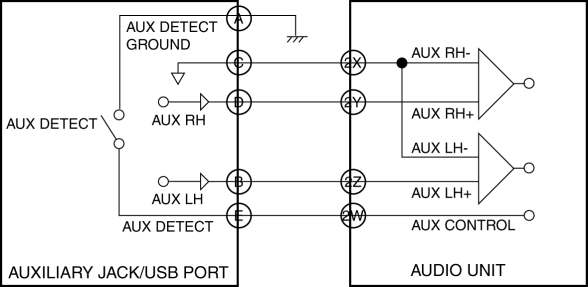
1. When the plug of a portable audio unit is connected to the auxiliary jack/USB port, the auxiliary jack/USB port sends the audio signal from the portable audio device to the audio unit.
2. When the audio unit is switched to AUX mode using the AUX button of the audio panel switch (without color LCD)/display (with color LCD), the commander switch, or the voice recognition function, the audio unit outputs the audio signal sent from the auxiliary jack/USB port to the speakers.
Without color LCD
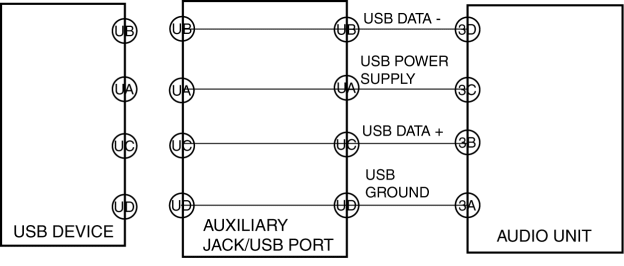
When the USB device/iPod is connected to the USB port for the auxiliary jack/USB port, the auxiliary jack/USB port sends the audio signal of the USB device/iPod to the audio unit.
When the audio unit is switched to the USB mode using the audio panel switch, the audio signal sent from the auxiliary jack/USB port is output to the speaker.
With color LCD
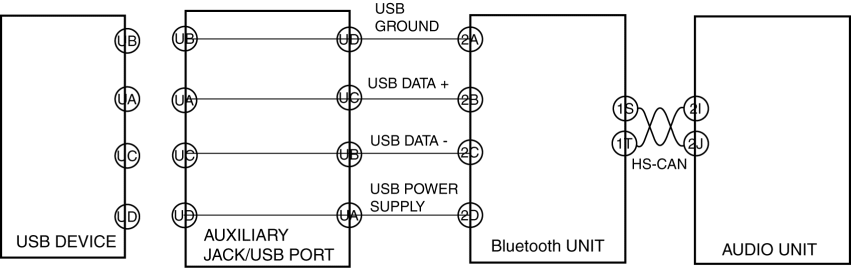
When the USB device/iPod is connected to the USB port for the auxiliary jack/USB port, the auxiliary jack/USB port sends the audio signal of the USB device/iPod to the Bluetooth unit.
When the audio unit is switched to the USB mode using the USB button in the audio unit display, the command switch operation, or the voice recognition function, the USB mode request signal is sent to the Bluetooth unit via CAN communication.
When the Bluetooth unit receives the USB mode request signal from the audio unit, the Bluetooth unit sends the voice signal for the USB device/iPod to the audio unit via CAN communication.
The audio unit outputs the voice signal received from the Bluetooth unit.
Function not equipped.